

Description
Download eIVF Patient – Fertility Clinic Management App, Patient Portal, IVF Treatment Tracker, Secure Medical Communication, Clinic Appointment Scheduler
Overview
eIVF Patient is a specialized desktop and mobile application developed by Practicehwy.com, designed specifically for patients enrolled in fertility clinics that utilize the eIVF Electronic Medical Record (EMR) system. The software serves as a secure digital portal, enabling patients to actively engage with their fertility treatment journey from their iPhone. Its primary purpose is to streamline access to critical medical information and enhance coordination between patients and clinic staff. By centralizing treatment data, patients can manage their care with greater transparency and efficiency.
The application is tailored for individuals undergoing assisted reproductive technologies, particularly in vitro fertilization (IVF), who require consistent monitoring, documentation, and communication with healthcare providers. It supports real-world scenarios such as tracking daily medication schedules, reviewing lab results, accessing procedural instructions, and managing appointment calendars. The software is not intended for standalone use or general public access; access is restricted to patients whose clinics are integrated with the eIVF EMR platform. This ensures data privacy and compliance with clinical workflows.
While the developer is identified as Practicehwy.com, no additional details about the company’s background or broader product portfolio were provided. The software is positioned as a supportive tool within a clinical ecosystem, emphasizing secure communication and real-time access to treatment-specific content.
Key Features & Capabilities
- Access to Treatment Protocols: Patients can view detailed treatment plans, including medication schedules, timing of procedures, and flowsheet data, ensuring alignment with clinical recommendations.
- Lab Results Tracking: Real-time access to test results allows patients to monitor key fertility indicators and understand their progress throughout the cycle.
- Consent Forms and Medical Instructions: Digital storage and viewing of consent documents and procedural guidelines, reducing the risk of miscommunication or lost paperwork.
- Secure Messaging: A built-in communication channel enables patients to send messages to physicians and clinic staff, supporting timely clarification of concerns or updates.
- Appointment Management: Users can view, reschedule, or confirm appointments directly through the app, improving scheduling efficiency.
- Medication Prescription Access: Patients can review their prescribed medications, dosages, and administration instructions, promoting adherence and safety.
These features collectively support a patient-centered approach to fertility care. For example, a patient can check their latest hormone levels after a blood draw, confirm their next embryo transfer date, and message their doctor about a scheduling conflict—all within a single interface. The integration with the eIVF EMR system ensures data consistency and reduces administrative burden on both patients and clinic staff.
User Interface, Workflow & Performance
The user interface of eIVF Patient is designed for clarity and ease of navigation, optimized for the iPhone’s touch-based environment. Key sections are organized into intuitive menus, allowing users to quickly access treatment data, messages, appointments, and medical documents. Navigation is linear and consistent, minimizing the learning curve for patients who may be under emotional or physical stress during treatment.
Workflow efficiency is enhanced by the app’s integration with the clinic’s EMR system, enabling real-time updates without manual data entry. Patients receive timely notifications about upcoming procedures, new lab results, or message replies, supporting proactive care management. However, exact performance details such as CPU usage, RAM consumption, or response times were not specified by the developer.
Stability and reliability are implied through the app’s secure communication framework and data synchronization with a clinical system. The developer did not provide information on background processes, update frequency, or error handling. Performance observations are based on general software behavior patterns for clinical mobile applications.
Compatibility & System Requirements
eIVF Patient is available exclusively for iOS devices, specifically designed to run on the iPhone. The application is distributed through the Apple App Store, ensuring compatibility with current and recent iOS versions. The installation size is not publicly disclosed, and no specific hardware requirements were provided.
Compatibility information is limited to the iOS platform, with no indication of support for Android, Windows, or Mac operating systems. The software requires a valid clinic-provided access credential to function, meaning it cannot be used without integration into the eIVF EMR ecosystem. The developer did not specify minimum device models or storage requirements.
Platform compatibility information is limited to the iPhone and iOS, with no details on older or newer versions beyond the standard App Store distribution model.
Pros and Cons
Pros
- Secure, clinic-specific access ensures patient data privacy and integrity.
- Centralized access to treatment protocols, lab results, and medical instructions.
- Real-time communication with clinic staff enhances care coordination.
- Intuitive interface optimized for mobile use during high-stress treatment cycles.
- Integration with eIVF EMR reduces data entry errors and improves workflow efficiency.
Cons
- Exclusive iOS availability limits access for non-iPhone users.
- Requires clinic-specific credentials; not available for general public download.
- No information on offline functionality or data synchronization during connectivity loss.
- Performance and system resource usage details were not provided.
- Not suitable as a standalone fertility management tool.
FAQ Section
Is eIVF Patient available for Android devices?
Currently, the app is only available for iPhone and iOS devices. There is no official Android version or support for other platforms.
Is the app secure and compliant with medical data standards?
As a clinic-integrated tool, eIVF Patient is designed to maintain secure communication and data handling. However, specific compliance details such as HIPAA or GDPR adherence were not disclosed in the provided information.
How do I get access to the app?
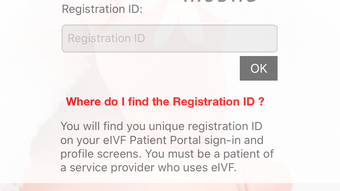
Access is granted only to patients whose fertility clinic uses the eIVF EMR system. You must obtain login credentials directly from your clinic’s staff.
Can I use the app without an internet connection?
While the app may support limited offline viewing of previously loaded content, no official information was provided regarding offline functionality or data sync behavior.
Does the app require a subscription or recurring fee?
There is no public information about pricing or licensing models. Access is tied to the clinic’s integration with the eIVF platform, not a direct purchase by the patient.
Final Thoughts + CTA
eIVF Patient delivers a focused, secure, and clinically integrated solution for patients navigating fertility treatments. Its strength lies in seamless access to essential medical data and direct communication with care providers, all within a user-friendly interface. While its exclusive iOS availability and clinic-dependent access limit broad adoption, it serves as a valuable tool for patients within the eIVF ecosystem.
For individuals undergoing IVF or other assisted reproductive procedures, this app enhances engagement, reduces administrative friction, and supports informed decision-making. It is not a replacement for clinical care but a powerful complement to it. If you are a patient at a clinic using eIVF’s EMR system, this tool can significantly improve your treatment experience.
Download eIVF Patient now
Guides & Tutorials for eIVF Patient
How to install eIVF Patient
- Click the Preview / Download button above.
- Once redirected, accept the terms and click Install.
- Wait for the eIVF Patient download to finish on your device.
How to use eIVF Patient
This software is primarily used for its core features described above. Open the app after installation to explore its capabilities.
User Reviews for eIVF Patient 0
No reviews found





